
LangChain with MCP: Connecting tools with flexibility and interoperability
Part 5 of the series "Everything You Need to Know About LangChain (Before Starting an AI Project)"

Welcome to the fifth post in our LangChain series!
In the previous post, we explored how to create agents with LangChain. Continuing on that topic, today we’ll look at how to use the Model Context Protocol (MCP) with LangChain and LangGraph.
This integration allows you to create more robust agents, with tools connected through an open and interoperable standard.
Follow our page on LinkedIn for more content like this! 😉
What is MCP?
The Model Context Protocol is a standardized protocol developed by Anthropic that enables structured and secure communication between language models and external tools.
It addresses one of the biggest challenges in AI application development: consistent integration with APIs, databases, and other services.
MCP makes it easier to reuse and connect tools in heterogeneous environments, which is useful in production settings or when there’s a need to interoperate with external systems.
See more: What is MCP, Creating your MCP server, the difference between A2A and MCP.
Why use MCP with LangChain?
LangChain is already known for its flexibility in building LLM-based applications, and integrating with MCP brings major benefits such as:
Standardization: MCP provides a consistent interface for any tool, eliminating the need for custom adapters for each API.
Security: The protocol includes built-in mechanisms for authentication and access control, ensuring secure interactions with external systems.
Flexibility: Native support for different types of tools, from simple REST APIs to complex database systems.
Where to start?
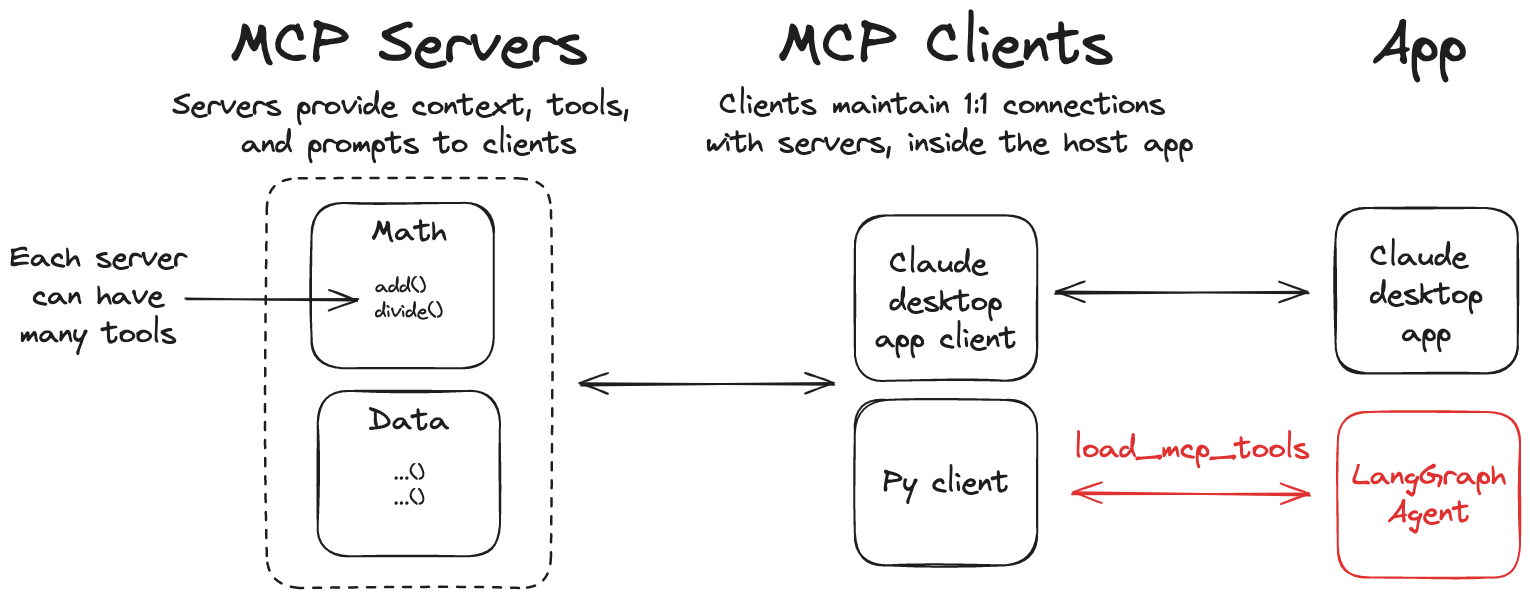
The LangChain team has already made an official repository with adapters available: langchain-ai/langchain-mcp-adapters.
With these adapters, you can register tools using the MCP standard and use them directly in LangChain agents, with support for communication via stdio, http, and other transports.
Practical Examples
Now, let’s put this integration into practice. We’ll create a few examples showing how our agent connects to external tools via MCP. You’ll see how the agent interprets your questions, automatically selects the appropriate tool, and delivers the correct answer.
1) Application to Convert Temperature Units
Let’s start with a simple example using a tool that converts temperature between Celsius, Fahrenheit, and Kelvin.
First, we’ll create our server using FastMCP. Copy and paste the code below into a file named temperature_server.py.
from mcp.server.fastmcp import FastMCP

mcp = FastMCP("TemperatureConverter")

@mcp.tool()
def celsius_to_fahrenheit(celsius: float) -> str:
    """Converts temperature from Celsius to Fahrenheit"""
    fahrenheit = (celsius * 9/5) + 32
    return f"{celsius}°C is equal to {fahrenheit:.2f}°F"

@mcp.tool()
def fahrenheit_to_celsius(fahrenheit: float) -> str:
    """Converts temperature from Fahrenheit to Celsius"""
    celsius = (fahrenheit - 32) * 5/9
    return f"{fahrenheit}°F is equal to {celsius:.2f}°C"

@mcp.tool()
def kelvin_to_celsius(kelvin: float) -> str:
    """Converts temperature from Kelvin to Celsius"""
    celsius = kelvin - 273.15
    return f"{kelvin}K is equal to {celsius:.2f}°C"

if __name__ == "__main__":
    mcp.run(transport="stdio")
Now, let’s create our client application, which will access these tools.
We’ll use Gemini as the main LLM of the application, but you can choose other models. In the file LangChain-first-steps.ipynb you’ll find examples of how to integrate different LLMs into LangChain, including running locally with Ollama.
